You have heard the horror stories. Someone stored thousands of dollars worth of Bitcoin on a software wallet or exchange and lost everything overnight to a hack. Now you are wondering: is there a safer way to store cryptocurrency? The answer is yes, and it is called a hardware wallet.
A hardware wallet is a physical device similar to a USB drive that stores your cryptocurrency private keys completely offline. Unlike software wallets on your phone or computer, a hardware wallet keeps your crypto safe from hackers, malware, and phishing attacks because your private keys never touch the internet.
But what exactly is a hardware wallet, how does it work, and is it really worth buying one? In this complete guide, you will learn everything about physical crypto wallets from how they protect your digital wallet security to step-by-step instructions on how to use a hardware wallet safely.
Table of Contents
Section 1: What Is a Hardware Wallet? Complete Definition & Overview
1.1 Hardware Wallet Definition — Explained Simply
A hardware wallet is a dedicated physical device designed specifically to generate, store, and manage cryptocurrency private keys in an offline environment. It is the most secure form of cryptocurrency storage available to individual users today.
Think of a hardware wallet like a bank vault you carry in your pocket. Your cryptocurrency does not actually live inside the device — it exists on the blockchain. What the hardware wallet stores is your private key: the cryptographic proof of ownership that allows you to authorize transactions. As long as your private key stays offline and inside the hardware wallet, no remote attack can ever steal your funds.
Key Hardware Wallet Entities:
- Private Key: The secret cryptographic key stored inside the hardware wallet
- Secure Element Chip: Tamper-resistant chip that isolates and protects your private keys
- Seed Phrase: 12-24 word backup that can recover your hardware wallet if lost
- PIN Code: Physical access protection for the device itself
- Firmware: The software running on the device — must be kept updated
- Transaction Signing: Process of approving crypto transactions offline
1.2 What Is the Point of Physical Crypto Wallets?
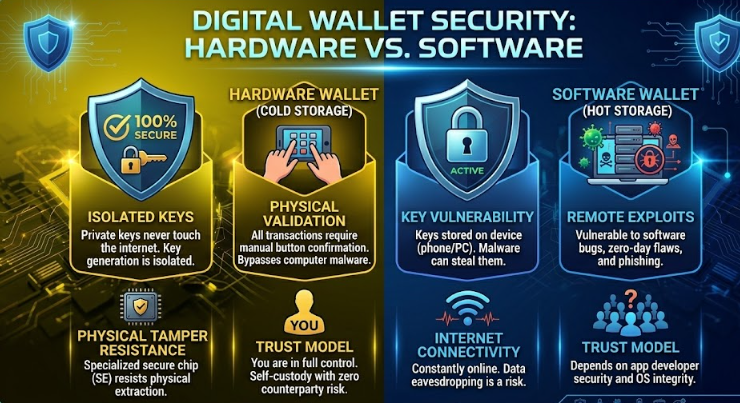
This is the most important question for anyone new to hardware wallets. What is the point of physical crypto wallets when free software wallets exist? The answer comes down to one fundamental security principle: your private keys should never touch an internet-connected device.
Every software wallet — whether on your phone, computer, or browser extension — exists in an environment that is potentially accessible by malware, keyloggers, and browser exploits. A skilled attacker who compromises your device can extract your private keys from a software wallet. With a hardware wallet, this attack is physically impossible because the private key never leaves the secure chip. This is the core principle behind wallet encryption — keeping keys away from internet-connected environments.
😰 Real Pain Point: Imagine losing $50,000 in Bitcoin because a malware program running silently in the background captured your software wallet’s private key while you were browsing the web. This happens to real people every single day and a hardware wallet prevents it completely.
1.3 Hardware Wallet vs Software Wallet vs Exchange
| Feature | Hardware Wallet | Software Wallet | Exchange |
| Private Key Control | ✅ You own it | ✅ You own it | ❌ Exchange owns it |
| Internet Exposure | ✅ Always offline | ❌ Always online | ❌ Always online |
| Hack Risk | ✅ Extremely low | 🟡 Medium risk | 🔴 High risk |
| Malware Vulnerability | ✅ None | ❌ Vulnerable | ❌ Vulnerable |
| Ease of Use | 🟡 Moderate | ✅ Very easy | ✅ Very easy |
| Cost | 💰 $50-$200 | ✅ Free | ✅ Free |
| Best For | Long-term storage | Daily spending | Trading only |
| Recovery Option | ✅ Seed phrase | ✅ Seed phrase | ❌ Customer support |
1.4 Hardware Wallets Explained: The Secure Element Technology
The heart of every hardware wallet is its Secure Element (SE) chip the same technology used in bank cards, passports, and SIM cards. This tamper-resistant chip is specifically designed to resist physical and digital attacks. Even if a sophisticated attacker physically disassembles your hardware wallet, the Secure Element chip is engineered to destroy its contents rather than reveal them.
When you use a hardware wallet to sign a transaction, the process happens entirely inside the Secure Element. Your private key generates the cryptographic signature without ever leaving the chip. The signed transaction is then sent to the blockchain but your private key stays safely locked inside the hardware device.
Section 2: How Does a Hardware Wallet Work? Step-by-Step Explanation
2.1 How Do Hardware Wallets Work — The Technical Process
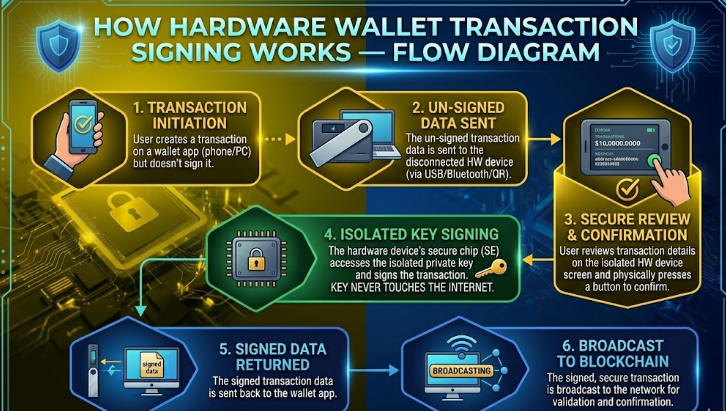
Understanding how hardware wallets work demystifies why they are so much more secure than software alternatives. The process involves four key stages that keep your private keys completely isolated from internet-connected devices.
Stage 1: Key Generation (Setup)
When you first set up a hardware wallet, the device uses its internal random number generator to create your private key entirely within the Secure Element chip. This key is never transmitted to your computer or any external device during generation. The result is a 24-word seed phrase — your master backup — which you write down on paper and store securely offline.
Stage 2: Transaction Creation (Initiation)
When you want to send cryptocurrency, your computer or phone creates an unsigned transaction. This transaction contains the recipient address, amount, and other details but no private key information. The unsigned transaction is sent to your hardware wallet via USB, Bluetooth, or QR code.
Stage 3: Transaction Signing (The Critical Step)
This is where hardware wallet security shines. Your hardware wallet displays the transaction details on its own screen completely independent of your potentially compromised computer. You physically verify the recipient address and amount on the hardware wallet’s display, then press the physical button to approve. The Secure Element chip signs the transaction using your private key internally. Only the signed transaction (not the private key) is returned to your computer.
Stage 4: Transaction Broadcast
Your computer receives the signed transaction and broadcasts it to the blockchain network. At no point during this entire process did your private key leave the hardware wallet. Even if your computer was infected with keylogging malware, the attacker captures nothing useful they never saw your private key.
2.2 How Does a Hardware Wallet Work With Multiple Cryptocurrencies?
Modern hardware wallets support hundreds of cryptocurrencies from a single device. This works through the HD (Hierarchical Deterministic) wallet structure the same technology discussed in our wallet encryption guide. From your single seed phrase, the hardware wallet can derive separate private keys for Bitcoin, Ethereum, Litecoin, and hundreds of other cryptocurrencies.
Each cryptocurrency uses its own derivation path from your master seed, meaning your Bitcoin and Ethereum private keys are completely separate but recoverable from the same 24-word seed phrase. This is why protecting your seed phrase is as critical as protecting the hardware wallet device itself.
2.3 Hardware Wallet Communication Methods
- USB Connection: Most reliable — direct wired connection to your computer
- Bluetooth: Wireless connection for mobile use (Ledger Nano X) — convenient but adds wireless attack surface
- QR Code (Air-Gapped): Most secure — device never physically connects to any computer
- NFC: Near-field communication for tap-to-pay style interactions
Section 3: Best Hardware Wallets in 2026 — Complete Comparison
3.1 Top Hardware Wallets Compared
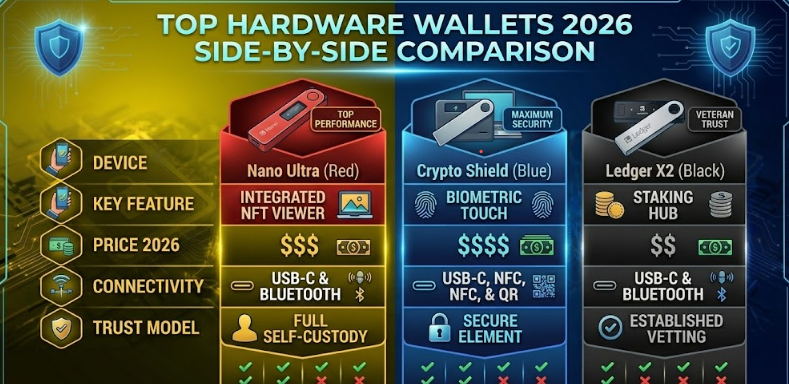
| Feature | Ledger Nano X | Ledger Nano S+ | Trezor Model T | Coldcard Mk4 |
| Price | $149 | $79 | $219 | $239 |
| Bluetooth | ✅ Yes | ❌ No | ❌ No | ❌ No |
| Touchscreen | ❌ No | ❌ No | ✅ Yes | ❌ No |
| Air-Gapped | ❌ No | ❌ No | ❌ No | ✅ Yes |
| Coins Supported | 5,500+ | 5,500+ | 8,000+ | Bitcoin only |
| Secure Element | ✅ Yes | ✅ Yes | ❌ No | ✅ Yes |
| Open Source | Partial | Partial | ✅ Full | ✅ Full |
| Best For | Mobile users | Budget pick | Beginners | Bitcoin maximalists |
3.2 What Is the Point of Physical Crypto Wallets for Different Users?
For Long-Term HODLers:
If you are holding cryptocurrency for months or years without regular trading, a hardware wallet is absolutely essential. The one-time cost of a hardware wallet is trivial compared to the value it protects. Think of it as insurance — you never regret buying it until the day you need it and do not have one.
For Active Traders:
Hardware wallets work best for your core holdings — the amount you are not actively trading. Keep your trading funds on a reputable exchange, but store the bulk of your crypto on a hardware wallet. This balance provides both security and operational convenience.
For Beginners:
New crypto holders often delay getting a hardware wallet because they think they do not have enough crypto to justify the expense. This is backwards thinking. The time to set up your digital wallet security is before you have significant holdings, not after a loss. Even $200 in crypto deserves hardware wallet protection.
🔗 Security Foundation: Before setting up your hardware wallet, read our Digital Wallet Security guide to understand the broader security ecosystem your hardware wallet fits into → /are-digital-wallets-safe-digital-wallet-security-guide
Section 4: How to Use a Hardware Wallet Complete Setup Guide
4.1 How to Use a Hardware Wallet — First-Time Setup
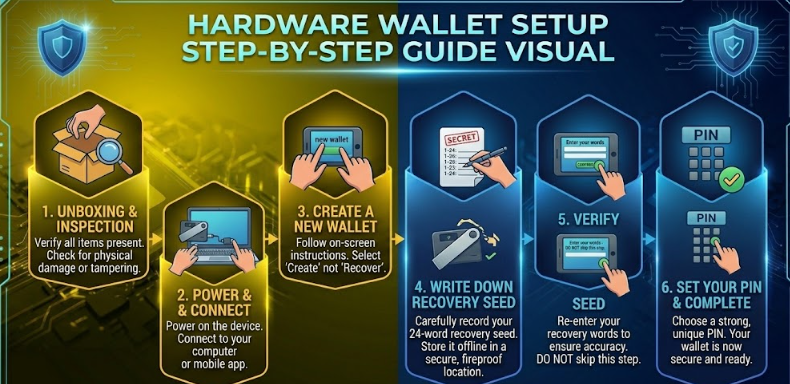
Step 1: Purchase From the Official Website Only
Always buy your hardware wallet directly from the manufacturer’s official website (ledger.com or trezor.io). Never buy a hardware wallet from Amazon, eBay, or third-party resellers. Counterfeit or tampered hardware wallets are a real threat — a compromised device could be pre-programmed to steal your private keys.
Step 2: Verify the Package Integrity
When your hardware wallet arrives, check that the packaging is sealed and shows no signs of tampering. Legitimate hardware wallets ship with tamper-evident packaging. If anything looks suspicious, contact the manufacturer immediately and do not use the device.
Step 3: Initialize the Device
Connect your hardware wallet to your computer and follow the setup instructions. The device will generate your seed phrase using its internal random number generator. Write down your 24-word seed phrase on the provided recovery sheet — use a pen, write clearly, and double-check every word.
Step 4: Secure Your Seed Phrase
Your seed phrase is more important than the hardware wallet device itself. Store it on paper in at least two secure physical locations. Never photograph it, type it into any device, or store it digitally. Consider upgrading to a metal seed phrase backup for fire and water resistance. This is the same seed phrase security practice covered in our wallet encryption guide the most critical step in protecting your crypto.
Step 5: Set a Strong PIN
Create a PIN of at least 6-8 digits that you will remember but cannot be easily guessed. Your hardware wallet will wipe itself after a set number of incorrect PIN attempts — a powerful anti-theft feature that protects against physical theft.
Step 6: Install the Companion App
Install the manufacturer’s official desktop app (Ledger Live or Trezor Suite) from the official website. These apps provide the interface for managing your crypto, installing coin apps on your device, and monitoring your portfolio — while keeping all private key operations on the hardware wallet.
Step 7: Test With a Small Amount
Before transferring significant funds, send a small test transaction to your hardware wallet address and then back out. Verify that the entire process works correctly — receiving, displaying on the device, and sending. Only after a successful test should you transfer your main holdings.
4.2 How to Use a Crypto Hardware Wallet Daily
- Always verify the recipient address on the hardware wallet screen never trust your computer screen alone
- Keep your hardware wallet firmware updated for the latest security patches
- Store your hardware wallet in a secure physical location when not in use
- Never enter your seed phrase into any website or app ever
- Use the hardware wallet’s own screen for address verification, not your computer
- Disconnect the hardware wallet from your computer when not actively using it
4.3 Hardware Wallet Pain Points and How to Solve Them
Pain Point: ‘Setting up seems complicated’
Modern hardware wallets like the Trezor Model T and Ledger Nano X have significantly improved their user experience. The Trezor Model T features a touchscreen that makes setup intuitive for beginners. Budget at least 30 minutes for your first setup — it gets much faster after that.
Pain Point: ‘What if I lose my hardware wallet?’
Losing the physical device is not a disaster — it is an inconvenience. Your cryptocurrency is recoverable from any compatible hardware wallet using your seed phrase. Buy a new device, enter your seed phrase, and all your funds are restored. This is why seed phrase security is your true priority.
Pain Point: ‘What if the company goes out of business?’
Hardware wallet manufacturers use open standards (BIP39, BIP44) for seed phrase generation. If Ledger or Trezor ceased to exist tomorrow, you could recover your funds using any compatible wallet software. Your seed phrase is your true ownership the device is just a secure interface.
Section 5: Frequently Asked Questions About Hardware Wallets
Q1: What is a hardware wallet in simple terms?
A hardware wallet is a small physical device like a USB drive that stores your cryptocurrency private keys offline. It keeps your crypto safe by ensuring your private keys never touch the internet, making remote hacking impossible. You use it to approve transactions by physically pressing a button on the device.
Q2: Do I really need a hardware wallet?
If you hold more cryptocurrency than you can afford to lose, yes — you need a hardware wallet. Software wallets and exchanges have been hacked repeatedly. A hardware wallet provides a level of security that software alone cannot match. The one-time cost of $50-$200 is insignificant compared to the value it protects.
Q3: What is the point of physical crypto wallets vs just using an exchange?
Exchanges control your private keys — meaning they control your crypto. The crypto community says ‘not your keys, not your coins’ for good reason. Multiple major exchanges have been hacked or gone bankrupt, with customers losing everything. A hardware wallet gives you true ownership of your cryptocurrency — no third party can freeze, confiscate, or lose your funds.
Q4: How do hardware wallets work when my computer has a virus?
This is hardware wallets’ greatest strength. Even on a virus-infected computer, your hardware wallet remains secure because: your private key never leaves the Secure Element chip, all transaction signing happens inside the device, you verify transaction details on the hardware wallet’s own trusted display, and your approval requires a physical button press on the device. A computer virus cannot replicate or steal a key that never enters the computer’s memory.
Q5: How to use a hardware wallet with multiple cryptocurrencies?
Most hardware wallets support hundreds of cryptocurrencies through their companion app (Ledger Live or Trezor Suite). Install the coin-specific app on your hardware wallet, generate a receive address for that cryptocurrency, and send funds to that address. All these different coin wallets are secured by your single seed phrase through the HD wallet structure.
Q6: What happens if I enter the wrong PIN too many times?
Your hardware wallet will wipe itself after a set number of incorrect PIN attempts (usually 3-10 depending on the device). This is a security feature, not a bug. You can then restore all your funds from scratch using your seed phrase on the wiped device or a new device. This is why keeping your seed phrase safe is critical.
Q7: Is a hardware wallet 100% secure?
No security solution is 100% secure, but hardware wallets are the most secure option available for individual cryptocurrency holders. The remaining risks are primarily physical — someone stealing both your device and seed phrase, supply chain attacks on counterfeit devices, or advanced physical chip extraction attacks that require sophisticated lab equipment. Buying directly from the manufacturer and storing your seed phrase securely eliminates the vast majority of these risks.
Conclusion: Is a Hardware Wallet Worth It?
Now you know exactly what a hardware wallet is, how physical crypto wallets work, and how to use a hardware wallet safely. The answer to whether it is worth it is simple: if your cryptocurrency holdings matter to you, a hardware wallet is not optional it is essential.
You have learned that hardware wallets store private keys in tamper-resistant Secure Element chips offline, transaction signing happens entirely within the device, physical crypto wallets protect against malware and exchange hacks, and your seed phrase is your true backup — more important than the device itself.
The digital asset world has no customer service number to call when your funds are stolen. There is no bank to reverse the transaction. A hardware wallet is the closest thing cryptocurrency has to a bank vault and it fits in your pocket.
🛡️ Take Action Now: Buy a hardware wallet from the official manufacturer website, set it up following this guide, and transfer your crypto off exchanges today. Your future self will thank you.