You just added your credit card to your phone’s digital wallet. Now a small voice in your head is asking: “Is this actually safe? Could someone steal my money?”
This fear is completely valid and extremely common. Millions of people use digital wallets every day without fully understanding the security risks involved. The problem is not just about hackers. It is about weak passwords, unencrypted apps, phishing scams, and poor mobile wallet security habits that put your money at risk every single day.
Here is the good news: digital wallets, when used correctly, are actually safer than physical wallets. But only if you follow the right digital wallet security practices. In this complete guide, you will learn exactly how digital wallets protect your data, what the real risks are, and the step-by-step wallet security tips you need to protect your money in 2026.
🔗 Also Read: Wallet Encryption: The Ultimate Guide to Bitcoin Security — learn how crypto wallet encryption protects your digital assets at the deepest level.
Table of Contents
Section 1: What Is Digital Wallet Security and Why Does It Matter?
1.1 Understanding Digital Wallet Security
Digital wallet security refers to the combination of technologies, protocols, and user practices that protect your digital payment accounts from unauthorized access, fraud, and theft. Whether you use Apple Pay, Google Pay, PayPal, or a cryptocurrency wallet, digital wallet security affects every transaction you make.
At its core, a digital wallet stores your payment credentials credit card numbers, bank account details, or crypto private keys — in an encrypted format. But encryption alone is not enough. True digital wallet security requires multiple layers of protection working together.
Key Digital Wallet Security Components:
- Encryption: Converts your payment data into unreadable code
- Tokenization: Replaces real card numbers with unique tokens for each transaction
- Biometric Authentication: Fingerprint or face recognition before payments
- Two-Factor Authentication (2FA): Second verification step for account access
- Real-time Fraud Monitoring: AI systems that detect suspicious transactions
- Remote Wipe Capability: Ability to erase wallet data if device is lost
1.2 The Real Pain Points: Why People Worry About Digital Wallet Safety
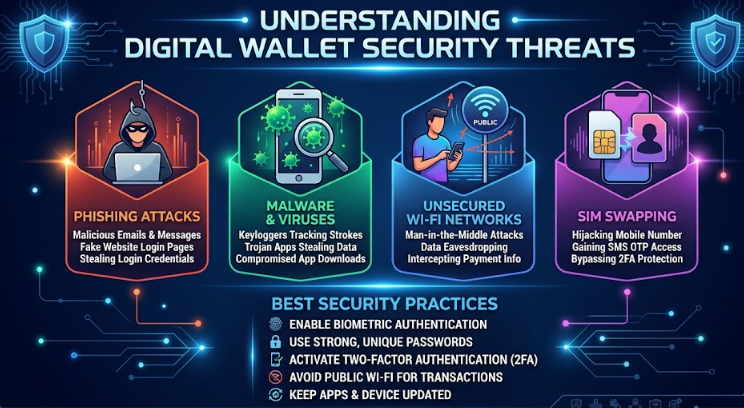
Let us be honest about the fears most people have about digital wallet security — because they are not irrational. These are real risks that deserve real answers:
Pain Point 1: “What if my phone gets stolen?”
This is the most common fear. The good news is that modern digital wallets use device-level biometric locks plus their own authentication layers. A stolen phone cannot be used to make payments without your fingerprint, face, or PIN. Your actual card numbers are never stored on the device — only encrypted tokens are used.
Pain Point 2: “What if the app gets hacked?”
Major digital wallet providers use bank-level AES-256 encryption and are subject to strict PCI DSS compliance standards. A breach of the app itself would not expose your real card numbers because tokenization ensures the actual data never leaves the payment network’s secure servers.
Pain Point 3: “What about public WiFi?”
This is a legitimate concern. Unsecured public WiFi is one of the biggest threats to mobile wallet security. Man-in-the-middle attacks on public networks can intercept unencrypted data. This is why every digital wallet security expert recommends never accessing your wallet on public WiFi without a VPN.
Pain Point 4: “Can someone scan my NFC payment card?”
NFC skimming is a real but overhyped threat. While technically possible, modern digital wallets use dynamic tokens that change with every transaction, making intercepted data useless for future fraud. Physical NFC-blocking wallets add an extra layer for the extra cautious.
1.3 How Secure Are Digital Wallets Compared to Physical Wallets?
| Security Feature | Physical Wallet | Digital Wallet |
| Theft Protection | ❌ None if stolen | ✅ Biometric + PIN lock |
| Card Number Exposure | ❌ Full number visible | ✅ Tokenized, never exposed |
| Remote Disable | ❌ Not possible | ✅ Remote wipe available |
| Fraud Detection | ❌ Manual only | ✅ AI real-time monitoring |
| Transaction Records | ❌ No digital trail | ✅ Full audit trail |
| Encryption | ❌ None | ✅ AES-256 encryption |
| Recovery if Lost | ❌ Money gone | ✅ Account recoverable |
Section 2: Mobile Wallet Security — How to Protect Your Phone Payments
2.1 The Unique Risks of Mobile Wallet Security
Mobile wallet security faces challenges that desktop or physical wallets do not. Your smartphone is always with you which means it is always at risk. Lost devices, malware-infected apps, shoulder surfing, and SIM swapping are all threats specific to mobile wallet security that require targeted protection strategies.
According to cybersecurity research, mobile payment fraud has increased significantly as adoption has grown. The most common attack vectors targeting mobile wallet security are not sophisticated hacks they are simple human errors like weak PINs, ignoring software updates, and downloading apps from unofficial sources.
Top Mobile Wallet Security Threats in 2026:
- Malware and spyware disguised as legitimate apps
- SIM swapping attacks that hijack your phone number for 2FA bypass
- Phishing SMS messages (smishing) impersonating your bank
- Shoulder surfing in public places during transactions
- Unsecured Bluetooth connections that expose payment data
- Outdated operating systems with unpatched security vulnerabilities
2.2 Step-by-Step Mobile Wallet Security Setup
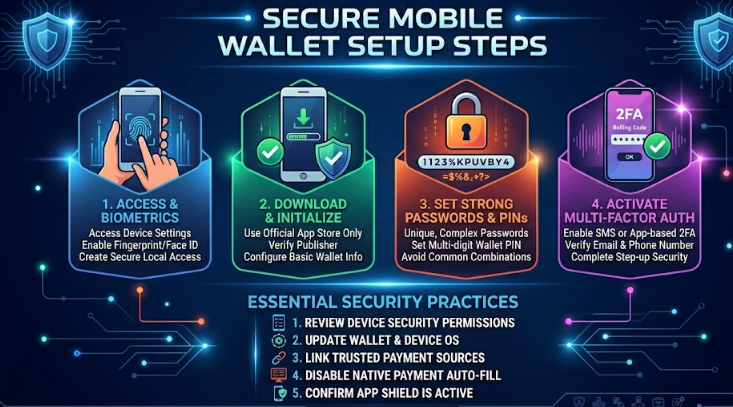
Step 1: Lock Your Device Properly
Your device lock is the first line of defense for mobile wallet security. Use a strong biometric lock (fingerprint or face ID) combined with a PIN of at least 6 digits. Never use obvious PINs like 123456, your birth year, or repeated digits. Enable auto-lock after 30 seconds of inactivity.
Step 2: Enable App-Level Authentication
Beyond device lock, enable authentication within the wallet app itself. Most major digital wallets require biometric confirmation for each transaction. Enable this feature even if it feels repetitive — it is a critical mobile wallet security layer that prevents unauthorized transactions even on an unlocked phone.
Step 3: Set Up Transaction Alerts
Enable real-time transaction notifications for every payment. This wallet security tip allows you to immediately spot unauthorized transactions and report them before significant damage occurs. Most banks offer instant SMS and email alerts for digital wallet transactions.
Step 4: Use Only Official App Stores
Only download digital wallet apps from the official Apple App Store or Google Play Store. Never install wallet apps from third-party websites or APK files. Fake wallet apps are a growing mobile wallet security threat designed to steal your credentials the moment you log in.
Step 5: Keep Everything Updated
Software updates are not just about new features — they contain critical security patches. Enable automatic updates for your operating system and all wallet apps. An outdated digital wallet app may contain known vulnerabilities that hackers actively exploit.
2.3 Are Mobile Wallets Safe on Android vs iOS?
Both Android and iOS offer strong mobile wallet security, but with different approaches. iOS uses a dedicated Secure Enclave chip that isolates biometric data and payment credentials from the main processor — even Apple cannot access this data. Android uses a similar Trusted Execution Environment (TEE) system.
The key difference is the app ecosystem. Android’s open nature means more risk of downloading malicious apps, making app source verification even more critical for Android mobile wallet security. iOS’s closed ecosystem provides an additional layer of protection by default.
🔗 Deep Dive: Learn about wallet encryption at the cryptographic level in our complete guide: Wallet Encryption & Bitcoin Security — /wallet-encryption-bitcoin-security-guide
Section 3: Wallet Security Tips — Expert Strategies for 2026
3.1 The 10 Most Important Wallet Security Tips
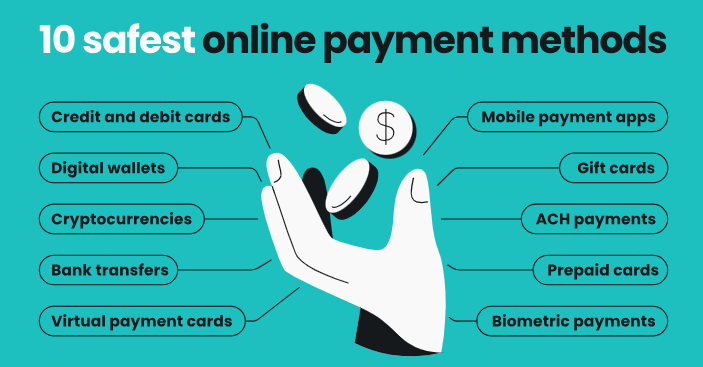
These wallet security tips come from cybersecurity experts and represent the most effective practices for protecting your digital payments. Implement all of them for maximum protection:
Wallet Security Tip #1: Use Strong, Unique Passwords
Your digital wallet account password should be at least 16 characters long, completely unique (not used anywhere else), and generated by a password manager. Weak passwords are responsible for the majority of digital wallet security breaches that are not caused by technical exploits.
Wallet Security Tip #2: Enable Two-Factor Authentication
2FA adds a second verification layer that stops unauthorized access even if your password is stolen. Use an authenticator app (Google Authenticator or Authy) rather than SMS-based 2FA, which is vulnerable to SIM swapping attacks. This is the single most impactful wallet security tip you can implement today.
Wallet Security Tip #3: Regularly Review Transaction History
Set a weekly calendar reminder to review your digital wallet transaction history. Early detection of unauthorized transactions dramatically reduces fraud losses. Most digital wallet providers offer zero-liability protection for reported fraud, but you must report it promptly.
Wallet Security Tip #4: Use Virtual Card Numbers
Many digital wallets and banks offer virtual card numbers — temporary card numbers linked to your real account. Use these for online purchases to protect your actual payment information. Even if a virtual card number is stolen, it can be cancelled without affecting your real account.
Wallet Security Tip #5: Never Share Credentials
No legitimate digital wallet company, bank, or payment processor will ever ask for your full password, PIN, or one-time passcode via phone, email, or chat. Anyone asking for these credentials is attempting fraud. This is the most violated wallet security tip despite being the most obvious.
Wallet Security Tip #6: Use a VPN on Public Networks
Always use a trusted VPN when accessing your digital wallet on public WiFi. A VPN encrypts all data between your device and the internet, preventing man-in-the-middle attacks that target mobile wallet security on unsecured networks.
Wallet Security Tip #7: Enable Remote Wipe
Set up remote wipe capability on your device before you need it. Both iPhone (Find My) and Android (Find My Device) allow you to remotely erase all data including digital wallet information if your device is lost or stolen. This is a critical but often overlooked wallet security tip.
Wallet Security Tip #8: Limit Stored Payment Methods
Only store payment methods you actively use in your digital wallet. Each additional stored card or account is an additional attack surface. Remove old or unused cards regularly. Apply the principle of minimum necessary access to your digital wallet security setup.
Wallet Security Tip #9: Check App Permissions
Review the permissions granted to your digital wallet app. A payment app should not need access to your contacts, microphone, or camera (unless for QR code scanning). Excessive permissions are a red flag for potentially malicious apps masquerading as legitimate digital wallets.
Wallet Security Tip #10: Set Spending Limits
Many digital wallets allow you to set daily transaction limits. Enabling these spending limits means that even if your wallet is compromised, the maximum damage is capped. This wallet security tip is especially important for mobile wallets used by younger users or in high-risk environments.
3.2 E-E-A-T in Digital Wallet Security: Trust the Right Sources
When researching digital wallet security, apply the same E-E-A-T (Experience, Expertise, Authoritativeness, Trustworthiness) standards that Google uses to rank content. Your wallet security is too important to trust to random online advice.
Trusted Sources for Digital Wallet Security Information:
- Your wallet provider’s official security documentation
- Your country’s financial regulatory authority (FDIC, FCA, etc.)
- Certified cybersecurity organizations (SANS Institute, NIST)
- Your bank’s official fraud prevention resources
- Independent security researchers with verifiable credentials
Section 4: Are Digital Wallets Safe for Different Use Cases?
4.1 Are Digital Wallets Safe for Online Shopping?
Yes — digital wallets are significantly safer than typing your card number directly into online stores. When you pay with a digital wallet like Apple Pay or Google Pay online, the merchant never sees your actual card number. They receive only a one-time token that is useless for future transactions.
This tokenization means that even if an online store you shop at suffers a data breach, your real payment information is never exposed. This is one of the most compelling wallet security benefits for online shoppers who use multiple websites.
4.2 Are Digital Wallets Safe for International Travel?
Digital wallets are generally safer than carrying physical cards when traveling internationally. They eliminate the risk of card skimming at ATMs and point-of-sale terminals — a significant threat in some regions. Many digital wallets also offer real-time foreign transaction notifications.
However, mobile wallet security during travel requires extra attention. Enable travel mode notifications with your bank, ensure your device has a strong lock, and avoid using public WiFi for wallet access. A travel VPN is an essential companion to your digital wallet when abroad.
4.3 Are Digital Wallets Safe for Business Use?
For business use, digital wallet security requires additional considerations. Business digital wallets often process higher transaction volumes and are higher-value targets for fraud. Implement strict access controls, require multi-person authorization for large transactions, and maintain detailed audit logs.
Many business digital wallet platforms offer enhanced security features like IP whitelisting, role-based access controls, and advanced fraud scoring. These features go beyond standard consumer wallet security tips and are essential for protecting business payment operations.
🔗 Related Guide: For cryptocurrency business wallets, see our complete guide on Wallet Encryption & Bitcoin Security strategies → /wallet-encryption-bitcoin-security-guide
Section 5: Frequently Asked Questions — Digital Wallet Security
Q1: Are digital wallets safe from hackers?
Yes, digital wallets use multiple security layers including AES-256 encryption, tokenization, and biometric authentication — that make them extremely difficult to hack directly. Most digital wallet fraud occurs through phishing, social engineering, or compromised device security rather than direct hacking of the wallet technology itself. Following the wallet security tips in this guide dramatically reduces your risk.
Q2: What happens if my phone with a digital wallet is stolen?
Your digital wallet is protected by your device’s biometric lock and the wallet app’s own authentication. A thief cannot make payments without your fingerprint, face ID, or PIN. Immediately use remote wipe to erase your device and contact your wallet provider to suspend the account. Your actual card numbers are never stored on the device, so your financial accounts remain secure.
Q3: Is mobile wallet security better than chip-and-PIN cards?
In most security aspects, yes. Mobile wallets use dynamic tokenization that generates a new token for every transaction, making intercepted payment data useless. Traditional chip-and-PIN cards use static data that, if compromised, can be used multiple times. However, mobile wallet security depends heavily on your device security practices.
Q4: Can someone steal money from my digital wallet using NFC?
NFC skimming is technically possible but practically very difficult to execute successfully against modern digital wallets. Even if a transaction is intercepted, the dynamic token used is valid for only one transaction and cannot be reused. The risk of NFC theft is significantly lower than traditional card skimming.
Q5: How do I know if my digital wallet app is secure?
Check that your wallet app comes from a verified, reputable provider, is downloaded only from official app stores, has not requested unnecessary permissions, uses biometric authentication, and is regularly updated. Read the app’s privacy policy and security documentation. Look for PCI DSS compliance certification and independent security audit reports.
Q6: Are digital wallets safe for large amounts of money?
For large amounts, additional wallet security tips apply: set up spending limits, require multi-factor authentication for large transactions, use a dedicated device for financial apps, and consider whether a hardware security key adds necessary protection. For very large cryptocurrency amounts, a hardware wallet with proper wallet encryption is recommended — see our Wallet Encryption guide for details.
Q7: What is the safest digital wallet to use?
The safest digital wallet depends on your use case. For everyday payments, Apple Pay and Google Pay offer excellent security through hardware-level tokenization. For online purchases, PayPal provides strong buyer protection. For cryptocurrency, hardware wallets like Ledger offer the highest security. In all cases, your personal security practices — following the wallet security tips in this guide — matter more than which specific app you choose.
Conclusion: Your Digital Wallet Security Action Plan
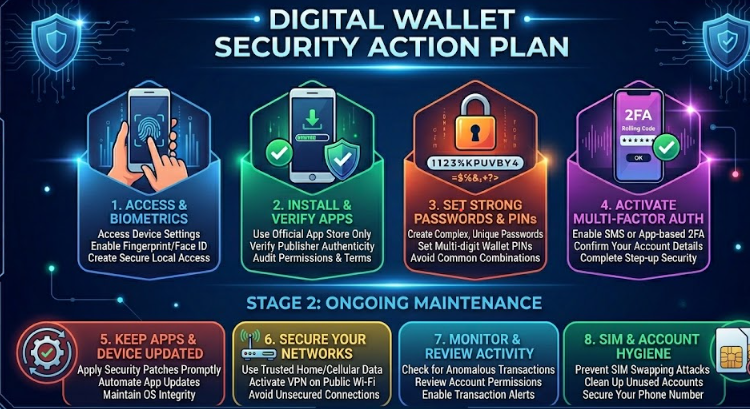
So are digital wallets safe? The answer is: yes — but only when you actively protect them. Digital wallet security is not a set-and-forget feature. It is an ongoing practice that requires awareness, consistent habits, and the right tools.
Digital wallets are technically safer than physical wallets due to encryption and tokenization, the biggest threats come from human error and poor security habits, mobile wallet security requires specific smartphone-level protections, and the wallet security tips in Section 3 represent your most effective defense.
✅ Take Action Now: Enable 2FA on your digital wallet today, set up transaction alerts, and review your app permissions. These three steps alone will dramatically improve your digital wallet security immediately.
Pingback: What Is a Hardware Wallet? 5 Reasons Your Crypto Isn't Safe Without One - Investova